

The Month iPhone Duo Gives Developers
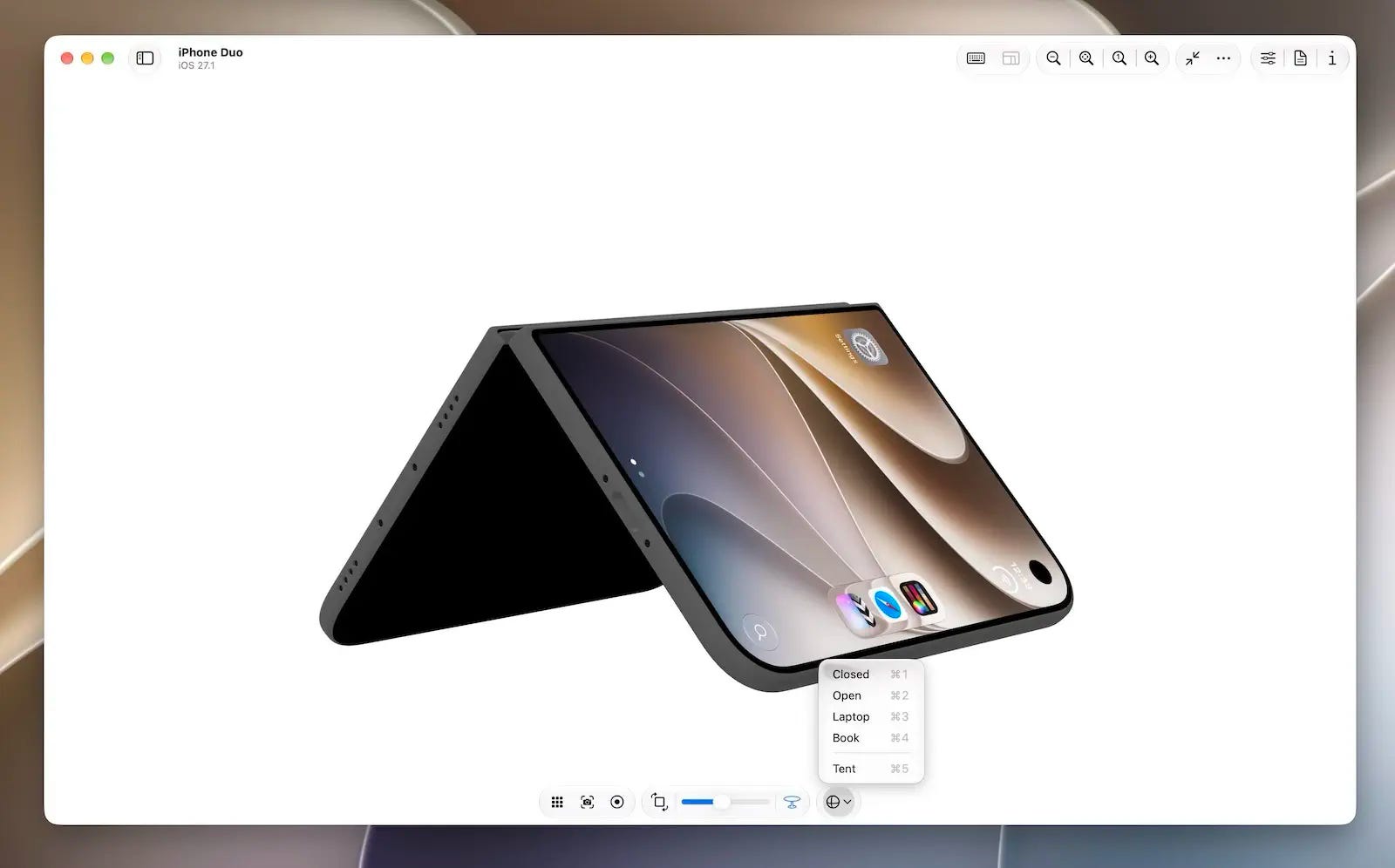
Xcode 27.1 beta, which includes the iPhone Duo simulator, was released on September 18—just five weeks before the device officially goes on sale on October 23. Curiously, Xcode 27.2 beta, which does not include Duo support, had already arrived by then. To prepare for Apple’s newest device, developers actually have to use the lower-numbered version of Xcode. This unusual “two-track beta” situation may stem from Duo having its own OS version and Apple’s need to maintain secrecy before the announcement, but the tradeoff is that developers have been left with a preparation window of only about a month.
In Device Hub, developers can open, close, rotate, and fold the virtual device. But any experienced engineer knows that while a simulator can reproduce geometry and poses, it cannot reproduce affordances or real-world physical interactions.
During this period without feedback from actual hardware, developers can easily drift toward one of two extremes: either feeling lost and becoming reluctant to venture beyond the safest choices, or staring at a virtual window and dreaming up specialized interactions that seem clever on screen but turn out to be awkward and frustrating when the device is actually held in the hand.
With the countdown already underway, a more pragmatic approach is to first draw a reasonable boundary around what “adapting” really means—to distinguish between “good enough” and “actually good.”
Apple has made it clear that existing apps can run on Duo without being rebuilt, but “it runs” obviously does not mean “it has been adapted.” Making sure an app presents itself naturally and reliably on the new device is the baseline for being “good enough” at launch. What an experience that is truly “good” on a foldable device looks like, however, may only begin to reveal itself once the hardware is actually in developers’ hands.
October 23 may not be the end of the Duo adaptation process. It may be the day it truly begins.
Previous Issue|Newsletter Archive
📢 Sponsor Fatbobman’s Swift Weekly
Promote your product to Swift & iOS developers across:
- Blog: 50,000+ monthly visitors
- Newsletter: 5,000+ subscribers, 50% open rate
Perfect for developer tools, courses, and services.
Enjoyed this issue? Buy me a coffee ☕️
Original
ArrangementView: Think Before You Arrange
When I first saw the ArrangementView API, something about it felt vaguely awkward, though I couldn’t quite put my finger on why. It wasn’t until I actually used it in Xcode 27.1 beta that the feeling began to take shape. After reading more of Apple’s materials and putting the API back into the context of the iPhone Duo, I realized that this discomfort came from two places. Part of it was simply that I hadn’t understood where the API was meant to fit; once I did, that part made sense. The other part came from the API itself—and remained even after I understood its design.
To use ArrangementView well, then, it helps to think one step further before reaching for it: What exactly is the relationship between the content? Which decisions can be left to the container, and which trade-offs still belong to the app? Think before you arrange.
Recent Recommendations
What’s new in Swift 6.4’s from Apple’s engineers
Taking the answers Apple engineers gave at the WWDC26 Swift Group Lab as his starting point, Xiangyu cross-checks each one against Evolution proposals, compiler source code, and official documentation. He clarifies which capabilities have actually shipped and which are still in transition, and corrects several version and implementation details from the live answers.
The most thought-provoking topic is “if we could do it over again.” In early Swift Concurrency, nonisolated async functions automatically left the caller’s actor and ran on the global concurrent executor. After years of real-world use, the Swift team now believes it makes more sense for them to stay on the caller’s actor by default. Had they been designing from scratch, that is what they would have shipped from day one. Although this behavior still requires explicit opt-in in Swift 6.4, it clearly shows how Swift Concurrency keeps recalibrating its defaults based on real migration experience.
withTaskCancellationShield: Swift 6.4 new feature
withTaskCancellationShield (SE-0504), introduced in Swift 6.4, lets a block of code run unaffected by its task’s existing cancellation state, which makes it well suited to wrap-up and cleanup logic that must complete. It does not undo the cancellation itself. Instead, code inside the shield (including any child tasks created there) temporarily cannot “see” the cancellation, and once execution leaves the shield, the original cancellation state becomes visible again. Because the API relies on the concurrency runtime that ships with the operating system, it is only available on the 27-series OSes and, unfortunately, cannot be back-deployed.
Omar Elsayed offers a transitional workaround: create an unstructured task and await its value. Cancellation does not automatically propagate to the new task, and awaiting its value ensures the current task waits for the cleanup to finish before moving on, so the result closely approximates the real shield. Omar also stresses that this is only a stopgap. It adds overhead and requires captured values to be Sendable. Once your minimum deployment target allows it, you should switch to the official API.
Running iOS Background Tasks Reliably, Part 2
In Part 1, Irving Popovetsky drew on long-term, on-device observation to develop a set of practices for making BGTaskScheduler more reliable. One problem, however, remained unsolved: when a user goes a long time without opening the app, the execution opportunities granted to background tasks gradually dwindle.
This time, he found a breakthrough in a single remark from WWDC20: the system does not throttle silent pushes based on how often an app is used. So he set up a Cloudflare Worker that writes a WakePing record to the CloudKit public database every hour, then uses a CKQuerySubscription to trigger a silent push that wakes the app. The whole process requires no device token management and touches no user data. After several months in production, syncs still fire almost exactly on the hour, even after three consecutive weeks without opening the app. This certainly doesn’t turn iOS background execution into a true cron, but it is an excellent demonstration of how combining BGTaskScheduler, CloudKit, and background notifications can meaningfully improve the reliability of background work.
Dissecting Xcode 27’s mcpbridge: Apple Skipped swift-sdk and Built Its Own MCP Stack
Although Apple also takes part in maintaining the official Swift MCP SDK, Xcode 27’s own MCP implementation takes a different path entirely. Snow Wu exported and examined the symbol tables of mcpbridge, mcp-server, and related private frameworks, and found that nearly everything, from JSON-RPC and the MCP semantic layer to command-line argument parsing, is built in-house.
This “start from scratch” approach isn’t merely about avoiding third-party dependencies. mcpbridge itself doesn’t even contain any tool definitions. It only handles protocol translation and routing between external agents and Xcode, while the actual tool capabilities remain inside Xcode. Combined with a three-process architecture, XPC communication, and a three-layer permission gate, it becomes clear that Apple isn’t simply embedding an MCP server in Xcode. Rather, it treats MCP as a system architecture problem: how to let untrusted external agents safely connect to a GUI application with complex state.
Apple Watch brings distributed system headaches to your app
When both iPhone and Apple Watch can read and modify the same state, what you’re dealing with is effectively a small distributed system: two independent nodes that may lose contact at any moment, keep modifying data on their own, and reconnect only hours or even days later. Jacob Bartlett revisits Watch Connectivity from this perspective, using the CAP theorem to dissect the trade-offs behind each WCSession API. sendMessage requires the counterpart to be immediately reachable, sacrificing availability during a partition in exchange for real-time, acknowledged interaction. updateApplicationContext and transferUserInfo, by contrast, tolerate temporary inconsistency in favor of availability; the former keeps only the latest state, while the latter delivers every change in order.
This perspective also turns “which Watch Connectivity API should I use?” from a question of interface capabilities into a question of product semantics. Login state, settings sync, recording controls, and other kinds of data have different requirements for consistency and availability, and different features within the same app can perfectly well make different choices.
iPhone Duo & AnyOS 27 Adaptation
codelaby introduces the Reserved Regions API added in iOS 27.1, and shows how to obtain the crease (division) and camera occlusion regions through
GeometryProxy. For custom layouts that system containers can’t handle automatically, it offers a reliable way to keep important content out of the crease and camera areas.Antoine van der Lee takes a practical, adaptation-first approach, systematically walking through the new capabilities: the iPhone Duo Simulator, resizable layouts,
ArrangementView, Reserved Regions, hinge state, and the vertical toolbar. The core idea is not to design a separate interface for Duo, but to first make your app genuinely adapt to variable space, then use Duo-specific APIs to enhance special cases.Ronnie W. discovered that macOS 27 re-decides how SwiftUI toolbar items are grouped: even with
ToolbarSpacer, items you intended to keep separate may still be merged into the same navigation island. The fix is refreshingly direct: when you need precise control over grouping, let AppKit’sNSToolbarItemGrouptake over the macOS toolbar structure.Anton Gubarenko compiled Apple engineers’ answers to developer questions from two iPhone Duo Group Labs (Part 2), covering a wide range of practical issues including adaptive layout, fold postures, the vertical toolbar, multiple windows, the camera, accessibility, and the Simulator. The advice running through it all is remarkably consistent: treat Duo as an iPhone with more variable space, rely first on system containers and adaptive layout, and only intervene with creases, hinges, and specific postures when truly necessary.
Sarunw explains how the system decides whether a toolbar item on iPhone Duo goes into the horizontal or vertical toolbar: provide both an icon and a title so the system can choose the presentation based on available space, and only when the default judgment isn’t right should you use
axisBehaviorto explicitly specify.horizontalOnlyor.verticalPreferred.
Tools
PaintKit: A Swift Raster Drawing and Image Processing Engine
Developed by Josh Lin, PaintKit is a standalone Swift raster drawing engine extracted from the ItsPaint project. It covers pixel storage and blending, rasterization, brushes and shapes, selections, undo, text rendering, and image and PDF encoding/decoding. The engine is built on premultiplied-alpha RGBA8 pixels, and every edit returns the region that actually changed, so both screen refreshes and undo records only need to process the pixels that matter. Undo history isn’t simply capped by operation count either; it is managed by actual memory usage through local pixel patches. PaintKit has no dependencies on AppKit, SwiftUI, or third-party libraries, adopts Swift 6 strict concurrency, and most of its functionality can be verified with swift test without launching an app or an Xcode project.
ItsPaint is the complete application and real-world proving ground for PaintKit. It is a lightweight, native macOS drawing and screenshot annotation tool offering 13 tools, including pencil, brush, shapes, text, selection, pixelate, and spotlight. It supports 15 shapes, nine export formats, and PDF annotation, and can remove simple backgrounds without using machine learning models or network services. ItsPaint is also open source and available as a free download on the App Store.
SwiftFairy: A SwiftUI Review Tool That Keeps Agents from Forgetting What They’ve Read
A macOS tool built by Natalia Panferova and Matthaus Woolard that provides Swift and SwiftUI code review for coding agents through a local MCP server.
Rather than writing a large set of rules into a Skill or AGENTS.md and hoping the agent recalls them at the right moment, SwiftFairy hands “finding problems” over to deterministic static analysis. It parses code into a partial graph, matches it against declarative issue patterns, pinpoints findings to specific lines, and then passes the corresponding explanations and fix examples to the agent. Knowledge only enters the context when an issue is actually hit, which both keeps the agent from “forgetting what it read” and reduces token usage.
Much of SwiftFairy’s value also comes from the rules themselves. The knowledge is currently organized into “Scrolls,” with the first batch covering Proper SwiftUI, Performant Swift Charts, and Modern Swift. The content draws on the two authors’ years of books and articles, as well as Natalia’s experience working on Apple’s core SwiftUI team. Compared with having another LLM do the review, SwiftFairy is more like adding a layer of domain-aware, reproducible static review to the agent workflow.
Thanks for reading Fatbobman’s Swift Weekly! This post is public so feel free to share it.
iPhone Duo 留给开发者的一个月
包含 iPhone Duo 模拟器的 Xcode 27.1 beta 于 9 月 18 日发布,距离 10 月 23 日正式发售仅五周。颇为微妙的是,彼时不含 Duo 支持的 Xcode 27.2 beta 已先行推出——想适配苹果最新的设备,反而要使用版本号更低的 Xcode。这种“双轨 Beta”或源于 Duo 独立的系统版本与发布前的保密需要,代价则是开发者的准备窗口被压缩到了一个月左右。
开发者可以在 Device Hub 中开合、旋转、折叠这台虚拟设备。但任何有经验的工程师都清楚:模拟器能够还原几何形态与姿态,却无法还原可供性与真实的物理交互。
在缺乏实体反馈的这段真空期,开发者很容易滑向两个极端:要么无所适从,不敢越雷池一步;要么对着虚拟窗口凭空构想出许多看似精巧、在真实握持下却别扭难用的专属交互。
面对紧迫的倒计时,更务实的做法是先为“适配”划定理性的边界,分清什么是“够用”,什么是“好用”。
Apple 已明确表示,现有应用即使不重新构建也可以在 Duo 上运行,但“能够运行”显然不等于“已经适配”。确保应用在新设备上自然、稳定地呈现,是上市前“够用”的及格线;至于什么才是真正属于折叠设备的“好用”体验,恐怕要等设备来到开发者手中后,才会逐渐浮现答案。
10 月 23 日,或许才是 Duo 适配真正开始的那一天。
如果您发现这份周报或我的博客对您有所帮助,可以考虑通过 Buy Me a Coffee 支持我的创作。
原创
ArrangementView:谋而后定
第一次看到 ArrangementView 的 API 时,我有一种说不出的别扭感。直到在 Xcode 27.1 beta 中实际使用后,这种感觉才逐渐清晰。查阅更多的苹果资料,再把它放回 iPhone Duo 的使用场景,我发现这份别扭其实来自两个方面:一部分源于我对它的定位不够清楚,理解之后便释然了;另一部分则来自 API 本身,即便想明白了,依然存在。
因此,想用好 ArrangementView 需要在使用前多想一步:内容之间究竟是什么关系?哪些结果可以交给容器,哪些取舍仍须由应用承担?谋而后定。
近期推荐
What’s new in Swift 6.4’s from Apple’s engineers
Xiangyu 以 WWDC26 Swift Group Lab 上 Apple 工程师的现场答疑为线索,逐一对照 Evolution 提案、编译器源码与官方文档,厘清了哪些能力已经落地、哪些仍处于过渡阶段,并订正了现场回答中若干版本与实现细节上的出入。
其中最耐人寻味的,是“如果重来一次”这个话题:早期的 Swift Concurrency 会让 nonisolated async 函数自动离开调用者所在的 actor,转到全局并发执行器(Global Concurrent Executor)上运行;经过数年的实践,Swift 团队认为,让它默认留在调用者的 actor 上才更为合理——若能从头设计,他们希望一开始便是如此。尽管这一行为在 Swift 6.4 中仍需显式启用,却清晰地展现了 Swift Concurrency 如何依据真实的迁移经验,不断校准自身的默认选择。
withTaskCancellationShield: Swift 6.4 new feature
Swift 6.4 引入的 withTaskCancellationShield(SE-0504)可以让一段代码不受所属任务已有取消状态的影响,非常适合必须完成的收尾和清理逻辑。它并不会撤销取消本身,只是让屏蔽范围内的代码(包括其中创建的子任务)暂时“看不到”取消状态;离开屏蔽区域后,原有取消状态会重新可见。由于该 API 依赖随系统分发的并发运行时(Concurrency Runtime),因此只能在 27 系列系统上使用,很遗憾无法向下部署。
Omar Elsayed 在文中给出了一个过渡方案:创建一个非结构化任务(Unstructured Task)并 await 其 value。由于取消状态不会自动传播到这个新任务,而等待 value 又能让当前任务等到清理结束后再继续,因此可以实现近似的效果。Omar 也强调,这只是权宜之计:不仅存在额外开销,还要求捕获的值满足 Sendable;待最低部署版本提升后,仍应改用正式 API。
Running iOS Background Tasks Reliably, Part 2
在 Part 1 中,Irving Popovetsky 通过长期的真机观察,总结出一套提升 BGTaskScheduler 可靠性的实践,但有一个问题始终无解:当用户较长时间不打开 App,后台任务获得的执行机会便会逐渐衰减。
这一次,他从 WWDC20 的一句提示中找到了突破口——系统不会依据 App 的使用频率来限制静默推送(Silent Push)。于是,他让 Cloudflare Worker 每小时向 CloudKit 公共数据库(Public Database)写入一条 WakePing 记录,再借助 CKQuerySubscription 触发静默推送唤醒 App。整个过程无需维护设备令牌(Device Token),也不触及任何用户数据。经过数月的实际运行,即便连续三周未打开 App,同步依然能近乎准点地按小时触发。这当然无法让 iOS 的后台执行变成真正的 cron,却很好地示范了如何将 BGTaskScheduler、CloudKit 与后台通知(Background Notification)组合起来,切实提升后台任务的可靠性。
拆解 Xcode 27 mcpbridge:Apple 没有用 swift-sdk,而是自研了一整套 MCP 栈
尽管 Apple 也参与了维护官方的 Swift MCP SDK,但 Xcode 27 自身的 MCP 实现却另辟蹊径。Snow Wu 导出并核对了 mcpbridge、mcp-server 及相关私有框架的符号表,发现从 JSON-RPC、MCP 语义层到命令行参数解析,Xcode 几乎全部采用自研实现。
这种“另起炉灶”并不只是为了规避第三方依赖。mcpbridge 本身甚至不包含任何工具定义,只负责在外部 Agent 与 Xcode 之间完成协议转换与路由,真正的工具能力仍由 Xcode 提供。再结合三进程架构、XPC 通信与三层权限闸门,可以看出 Apple 并不只是在 Xcode 里嵌入一个 MCP Server,而是将 MCP 视为一个系统架构问题:如何让不可信的外部 Agent 安全地接入一个状态复杂的 GUI 应用。
Apple Watch brings distributed system headaches to your app
当 iPhone 与 Apple Watch 都能读取并修改同一份状态时,你面对的其实已是一个小型分布式系统:两个独立节点随时可能失联,各自继续修改数据,并在数小时甚至数天后才重新连接。Jacob Bartlett 从这一视角重新审视 Watch Connectivity,借 CAP 理论剖析各个 WCSession API 背后的取舍:sendMessage 要求对端即时可达,以牺牲分区时的可用性换取实时、可确认的交互;updateApplicationContext 与 transferUserInfo 则容忍短暂的不一致,优先保证可用性,前者只保留最新状态,后者按序投递每一次变更。
这种视角也让“该选择哪个 Watch Connectivity API”从接口能力问题变成了产品语义问题:登录状态、设置同步、录音控制等数据,对一致性和可用性的要求并不相同,同一个 App 的不同功能完全可以做出不同选择。
iPhone Duo 和 AnyOS 27 适配
codelaby 介绍了 iOS 27.1 新增的 Reserved Regions API,以及如何通过
GeometryProxy获取折痕(division)和摄像头遮挡(occlusion)区域。对于系统容器无法自动处理的自定义布局,它提供了一种避免重要内容落入折痕或摄像头区域的可靠方式。Antoine van der Lee 从实际适配出发,系统梳理了 iPhone Duo Simulator、可调整布局、
ArrangementView、Reserved Regions、铰链状态和垂直工具栏等新能力。核心思路并不是为 Duo 单独设计一套界面,而是先让应用真正适应可变空间,再用 Duo 专属 API 对特殊场景进行增强。Ronnie W. 发现 macOS 27 会重新决定 SwiftUI Toolbar 的分组,即使使用
ToolbarSpacer,原本希望分开的项目仍可能被合并进同一个 navigation island。文章给出的解决方案相当直接:在需要精确控制分组时,让 AppKit 的NSToolbarItemGroup接管 macOS 工具栏结构。Anton Gubarenko 整理了两场 iPhone Duo Group Lab 中 Apple 工程师对开发者问题的回答(第二部分),涵盖自适应布局、折叠姿态、垂直工具栏、多窗口、摄像头、无障碍以及 Simulator 等大量实际问题。贯穿其中的建议十分一致:把 Duo 当作拥有更多可变空间的 iPhone,优先依赖系统容器和自适应布局,只有确有需要时再介入折痕、铰链和特定姿态。
Sarunw 解释了 iPhone Duo 上系统如何决定 Toolbar Item 应进入水平还是垂直工具栏:为项目同时提供图标和标题,让系统根据空间选择表现形式;只有在默认判断不合适时,才通过
axisBehavior明确指定.horizontalOnly或.verticalPreferred。
工具
PaintKit:Swift 栅格绘图与图像处理引擎
Josh Lin 开发的 PaintKit,是 ItsPaint 项目中一套可以独立使用的 Swift 栅格绘图引擎,涵盖像素存储与混合、光栅化、画笔与形状、选区、撤销、文字渲染,以及图片和 PDF 编解码等能力。引擎以预乘 Alpha 的 RGBA8 像素为基础,每次编辑都会返回实际发生变化的区域,使画面刷新和撤销记录都只需处理必要的像素;撤销历史也不是简单限制操作次数,而是通过局部像素补丁按实际内存占用管理。PaintKit 不依赖 AppKit、SwiftUI 或第三方库,采用 Swift 6 严格并发模式,大部分功能无需启动应用或 Xcode 工程即可通过 swift test 验证。
ItsPaint 则是 PaintKit 的完整应用与实践验证。它是一款面向 macOS 的轻量级原生绘图及截图标注工具,提供铅笔、画笔、形状、文字、选区、像素化和聚光灯等 13 种工具,支持 15 种形状、九种导出格式和 PDF 标注,在不使用机器学习模型与网络服务的情况下移除简单背景。ItsPaint 同样开源,并可在 App Store 免费下载。
SwiftFairy:让 Agent 不再“读过就忘”的 SwiftUI 审查工具
由 Natalia Panferova 与 Matthaus Woolard 打造的 macOS 工具,通过本地 MCP 服务器为编码 Agent 提供 Swift 与 SwiftUI 代码审查。
与把大量规则写进 Skill 或 AGENTS.md、再期待 Agent 在正确的时候想起它们不同,SwiftFairy 将“发现问题”交给确定性的静态分析:它把代码解析为局部图,与声明式的问题模式进行匹配,将发现精确定位到代码行,再把对应的解释和修复示例交给 Agent。知识只在真正命中问题时才进入上下文,既避免了 Agent “读过就忘”,也减少了 Token 消耗。
SwiftFairy 的价值也很大程度来自规则本身。目前这些知识以“卷轴”(Scrolls)的形式组织,首批包括 Proper SwiftUI、Performant Swift Charts 与 Modern Swift,内容来自两位作者多年积累的书籍与文章,以及 Natalia 曾参与 Apple SwiftUI 核心团队工作的经验。与让另一个 LLM 来 Review 相比,SwiftFairy 更像是在 Agent 工作流中加入了一层具有领域知识、结果可重复的静态审查。