

macOS for the Masses, or macOS for Developers?
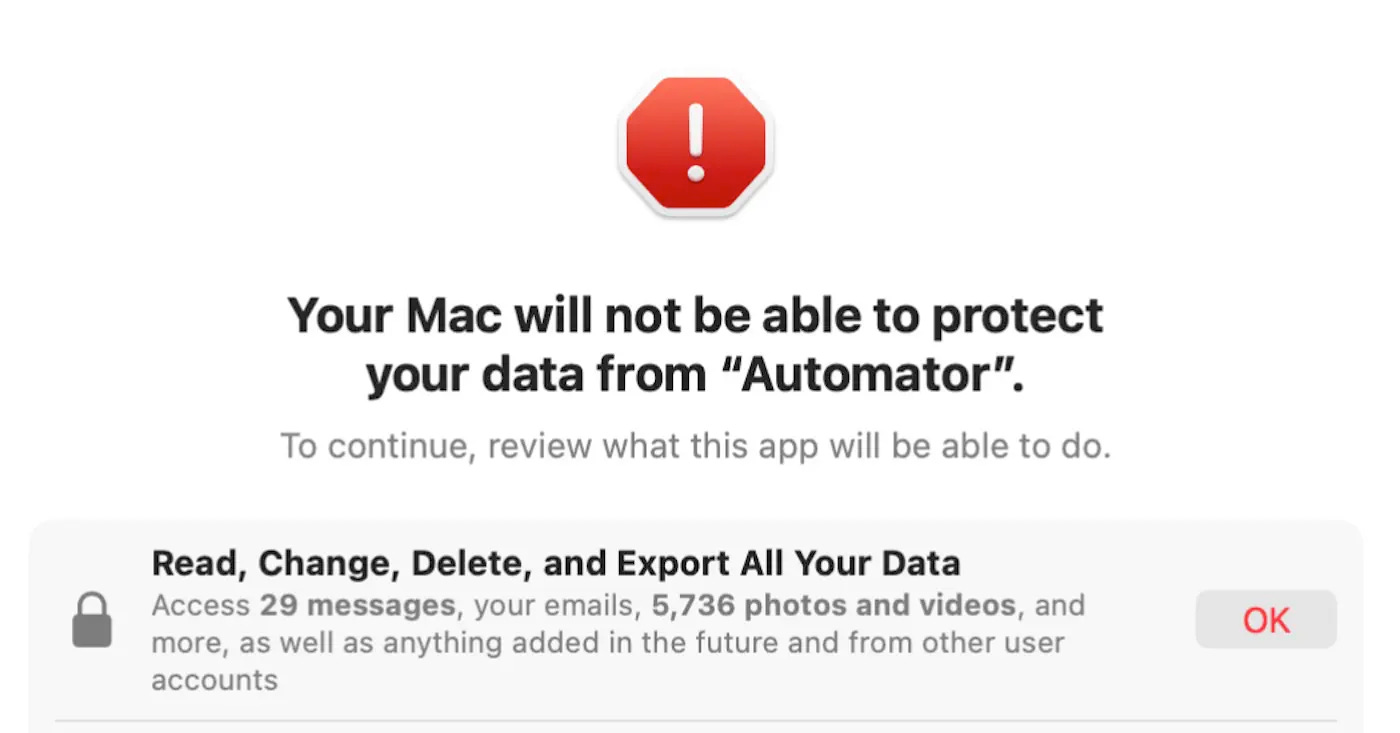
In macOS 27.3 beta 2, when users grant an app Full Disk Access, they are greeted with a dialog carrying a far stronger warning than in any previous version, while the system further steers users toward fine-grained, per-folder or per-app permissions.
This change quickly sparked considerable discussion. Some find Apple’s approach understandable given how sensitive this permission is, while many developers are disappointed. In the era of agents, this design philosophy faces a clear paradox: in traditional human-driven workflows, fine-grained permissions effectively reduce security risks; yet in agent workflows that require autonomous collaboration across tools and directories, demanding real-time user confirmation every time a permission boundary is crossed can turn a mechanism meant to protect users into a frequent point of interruption. Compared with agent-friendly systems like Omarchy, this friction on macOS is becoming increasingly noticeable.
As a developer, I feel this frustration firsthand. For example, even after granting full permissions to Xcode headless MCP, simply opening Xcode still triggers a permission prompt when capturing Preview screenshots. On the other hand, I completely understand Apple’s reasoning behind these strict permission controls. A major reason I chose Macs for my family was the tighter security protection macOS offers everyday consumers. Over the years, their Macs have genuinely benefited from this strict oversight, remaining largely free of security issues.
In the recent Apple Creator Studio update, Apple not only added MCP support to several apps, but also open-sourced a companion library for reading and writing documents along with an official Skill, making it easy for agents to call them directly. This shows that Apple is still actively responding to the demands of the AI era. Still, there is clearly a long way to go in accommodating the vastly different ways everyday consumers and developers use agents.
macOS is not only a go-to platform for developers, but also the daily operating system for hundreds of millions of everyday users. I don’t think it is realistic to expect Apple to loosen its strict permission controls in the mainstream release. However, introducing a permission model better suited for developers and agents inside macOS virtual machines—using the VM’s isolation boundary to convert certain high-frequency authorizations into a one-time grant for the entire development environment—may be a path worth exploring. Virtualization isn’t just useful for local development; it is also a key foundation for future cloud-based builds, testing, and automated workflows. It can offer developers a freer execution environment while keeping a healthy separation from everyday consumer use, without weakening the host machine’s security defenses.
I hope to see that day arrive soon.
Previous Issue|Newsletter Archive
📢 Sponsor Fatbobman’s Swift Weekly
Promote your product to Swift & iOS developers across:
- Blog: 50,000+ monthly visitors
- Newsletter: 5,000+ subscribers, 50% open rate
Perfect for developer tools, courses, and services.
Enjoyed this issue? Buy me a coffee ☕️
Recent Recommendations
Raycast has solved keyboard dictation without main app round-trip
Ever since Apple introduced third-party keyboard extensions in iOS 8, it has prohibited Keyboard Extensions from directly accessing the microphone. To implement voice dictation, developers have typically had to jump to the main app to start recording and then switch back to the keyboard, or maintain a recording session using background audio mode. Recently, Johan Thorell from Raycast shared a new approach: taking advantage of the difference between WebKit’s media capture mechanism and the process restrictions of native keyboard extensions, he embedded a WKWebView inside a keyboard extension, captured audio via JavaScript’s getUserMedia(), and passed the data to Swift for speech recognition. The discovery quickly drew widespread attention in the community, and Stephan Cilliers soon followed up with a complete open-source implementation.
As this workaround rapidly gained traction, KeyboardKit voiced clear concerns in its post: Apple could disable this behavior in a system update at any time, or reject apps using this technique during App Review. As voice input becomes increasingly widespread, the question may no longer be whether developers can find ways around the restriction, but whether Apple should provide an official, controlled voice input API for third-party keyboards.
How an Animation Gets to the Screen
Moving a view from one side of the screen to the other may rely on completely different underlying mechanisms across UIKit, AppKit, and SwiftUI. In this article, Mihaela Mihaljević Jakić conducts extensive comparative testing across five animation properties and four animation types on Mac, iPhone, iPad, and simulators. Combining call stacks, disassembly, shared memory, and Mach Message analysis, she traces an animation’s full journey from code to screen. Her findings show that in the tested macOS environment, SwiftUI animations rely on the main thread to update layers frame by frame; on iOS and iPadOS, however, SwiftUI computes animation values on a dedicated AsyncRenderer thread and passes them to the Render Server through Core Animation’s private Presentation Modifier mechanism.
For a long time, many developers have viewed SwiftUI as an abstraction layer sitting on top of UIKit and AppKit. Yet growing evidence suggests that SwiftUI is forming a much more independent implementation across layout, computation, and rendering. At WWDC 2026, Apple also stated explicitly that the three UI frameworks are gradually converging on a unified underlying architecture, with parts of SwiftUI even becoming the foundation that UIKit and AppKit now rely on. This means developers can no longer depend solely on past experience when building, debugging, or optimizing performance. We have to face a clear reality: SwiftUI is no longer just a new option within Apple’s UI stack—it is becoming a core cornerstone of the entire ecosystem.
Syncnext: Real-Time Video Frame Interpolation on Apple TV
How do you boost 25 fps video to 50 fps in real time on Apple TV while balancing image quality, motion continuity, and hardware performance? In this post, Ronnie Wong documents the full journey of building real-time frame interpolation for her tvOS media player, Syncnext. After experimenting with VideoToolbox, Metal motion compensation, OBS Optical Flow, and RIFE, Ronnie ultimately built on top of VideoToolbox and developed custom local phase reconstruction and region-selection algorithms to eliminate detail flickering in densely textured areas on interpolated frames.
The article’s value lies not just in the algorithms themselves, but in how the author built a repeatable verification pipeline: starting from visually spotting artifacts, moving to quantifying issues through motion trajectories, luminance variations, and detail preservation metrics, and discovering that optimizing a single metric in isolation can actually degrade motion quality. On real Apple TV hardware, she repeatedly tested and tuned GPU workloads alongside algorithmic strategies—because hitting 50 fps in a short run does not guarantee the device can sustain the same performance after prolonged runtime and elevated temperatures.
Compared to iOS and macOS, tvOS has far fewer developers, and those who consistently share hands-on experience are rarer still. Ronnie Wong’s blog chronicles the real-world challenges she has encountered while building tvOS apps—from SwiftUI focus management, system permissions, and App Store review to player architecture and performance optimization. Compared with typical API tutorials, these battle-tested lessons and engineering trade-offs from a shipping product can do far more to help fellow developers avoid common pitfalls.
SwiftUI ArrangementView for iPhone Duo Layouts
Introduced in iOS 27.1, ArrangementView brings a new adaptive layout approach for foldable devices such as iPhone Duo. Using a recipe app as an example, Sean Allen walks through how to use ArrangementView. Beyond the API specifics, the most valuable part of the post is Sean’s explanation of the design philosophy behind ArrangementView: developers describe the relationships and priorities between pieces of content, and SwiftUI decides how to arrange them based on the actual layout environment. Moreover, ArrangementView is not built exclusively for foldables—it works across other Apple devices that support the API as well. iPhone Duo simply makes this ability to dynamically organize content around the layout environment much more intuitive.
When I first encountered
ArrangementView, I felt uneasy about its design philosophy and API. Through recent hands-on work, however, I have gradually come to appreciate the idea it advocates: letting layouts adapt to changing environments by describing relationships between content. Even though I did not end up using the official API directly—moving from a customArrangementHViewto an implementation built on system split views—that experience convinced me further that in many scenarios, expressing content relationships and priorities is a better fit than prescribing exact arrangements. Still, declaring content relationships is only the starting point; developers must also account for device form-factor transitions, system container behavior, and content state and lifecycle across layout changes.
SwiftUI Liquid Glass: glassEffect, containers and morphing
Centered around APIs such as glassEffect, GlassEffectContainer, glassEffectID, and glassEffectUnion, this article uses code examples to cover the fundamentals of Liquid Glass in SwiftUI, morphing animations, and compatibility handling.
More than the tutorial itself, what I really want to recommend is the website behind it: Liquid Glass Design. It curates a rich collection of Liquid Glass and Glassmorphism designs spanning app interfaces, controls, icons, and motion effects, complete with style prompts ready for AI image generation. The site also compiles Apple’s official design guidelines, Figma components, third-party implementations, and cross-platform tutorials.
As AI coding becomes widespread, implementing an interface is getting easier than ever—but coming up with a strong design direction is not. Liquid Glass Design’s Gallery and Prompt Library neatly serve both stages: first exploring visual directions through curated examples, then rapidly generating concepts with AI. It offers more than technical knowledge about Liquid Glass; it provides design inspiration and a starting point for visual exploration.
I gave Claude a Mac mini…
As coding agents continue to improve, code generation speed is no longer the primary bottleneck in development—building, simulators, and test verification are increasingly taking its place. In this post, NatashaTheRobot shares how she rented a Mac mini to build a shared build-and-test environment for multiple parallel coding agents, coordinating simulator usage through a resource queue.
Natasha put together a tiered verification pipeline: if a change can be checked with Swift Package tests, don’t boot a simulator; if it can be verified with SwiftUI Previews, don’t run UI tests; only claim a simulator when a full runtime environment is genuinely needed. This highlights an important insight: the efficiency of parallel agent development does not depend solely on how many agents you run at once, but on whether your development system can deliver timely, reliable verification feedback to all of them.
I used AI agent skills to make five iOS screenshot sets
Creating App Store promotional screenshots has always been a time-consuming task for indie developers—especially when apps must support multiple device sizes, languages, or a whole portfolio of products. In this post, Stalin Kay shares how he used two Agent Skills, StoreShot and App Store Screenshots, to produce iPhone and iPad screenshot sets for five iOS apps.
In his workflow, Stalin captures raw app screens with Fastlane Snapshot and personally decides the screen order, copy, device frames, and color palettes, while the agent sets up an editable layout project to handle arrangement, previews, and exports. StoreShot focuses more on fine-grained control over individual screenshots, whereas App Store Screenshots provides a gallery-style preview for planning an entire set cohesively. Rather than generating one-off marketing images, the real value of this workflow lies in preserving screenshots, copy, and layouts as editable, reproducible engineering assets—making future app updates and localization far easier.
Tools
App Store Compliance Playbook: A Pre-Submission Checklist for App Review
Developed by Mirza Iqbal, App Store Compliance Playbook is a pre-submission self-check toolkit and review-guideline reference for both the App Store and Google Play. The project documents over a hundred common rejection reasons alongside remediation advice, provides scripts to catch common issues in permission usage descriptions, privacy manifests, and store metadata, and includes manual checklists reminding developers to verify items that cannot be checked automatically—such as demo accounts, screenshots, and privacy disclosures.
Using it is straightforward: run a scan in your project directory to surface potential review risks, and once your store metadata is ready, validate copy lengths, privacy policy links, and subscription terms. Teams that ship frequently can also plug it into CI, or integrate it into coding agent workflows like Codex and Claude Code via Skills and Hooks to run checks automatically before submission.
SiliconForest: Running Open-Source Darwin on Apple Silicon
Created by Chris Kearney, SiliconForest is an open-source operating system project built on Darwin/XNU. Starting from PureDarwin, it ports select Apple Silicon drivers from Asahi Linux and achieves GPU acceleration through Mesa, enabling a Darwin system independent of macOS to boot natively on an M1 MacBook Pro without a virtual machine.
Today, SiliconForest can run the Wayland-based Chonkstep desktop environment with support for Wi-Fi, the trackpad, Touch Bar, and hardware video decoding—and can even launch unmodified macOS versions of Firefox as well as Apple’s Terminal and Activity Monitor. These apps run on ported or reimplemented system frameworks rather than macOS itself. That said, the project is still in an early experimental stage: it has only been verified on a single M1 MacBook Pro and does not yet offer an installer or a complete end-to-end build for other developers.
SiliconForest also faces an unresolved licensing and distribution issue. While the project’s original code is licensed under MIT, its ported drivers and system components span licenses such as GPL and APSL. In particular, whether GPL-2.0 drivers prelinked with APSL-2.0 XNU into a single kernel collection can be legally distributed remains to be seen.
GlassIntroKit: Building App Onboarding Animations with Liquid Glass and Metal
Developed by Jiaxu Li, GlassIntroKit is a SwiftUI welcome and onboarding component suite for iOS and macOS. Combining Liquid Glass with Metal, it offers eight composable onboarding pages—including animated handwriting, symbol transitions, 3D scenes, node graphs, physics animations, and app icons. Rather than switching abruptly between screens, pages flow seamlessly into one another through continuous glass morphing, creating a cohesive visual experience. Compared to typical onboarding libraries, GlassIntroKit focuses on brand storytelling and visual presentation rather than functional steps like permission requests or user data collection.
Twoyi: Running Android on iPhone and iPad
Developed by weishu, Twoyi started out as a lightweight, free system container on Android and has now expanded its target to iOS and iPadOS. It can run Android 13 on iPhone and iPad without jailbreaking or JIT, supports installing APKs, and leverages the device GPU for graphics acceleration. To keep overhead low, the project uses AOT code translation and a Linux kernel interface compatibility layer rather than traditional full hardware emulation. It supports iOS and iPadOS 15 and later.
Twoyi’s earlier open-source repository was archived in 2023 under the MPL-2.0 license. However, no complete public source code corresponding to the new iOS implementation has been found so far, so it should not be regarded as a fully open-source Android runtime environment.
Thanks for reading Fatbobman’s Swift Weekly! This post is public so feel free to share it.
大众的 macOS,还是开发者的 macOS?
在 macOS 27.3 beta 2 中,当用户为某个应用授予完全磁盘访问权限时,会看到一个警告意味远超以往任何版本的提示框,系统也在进一步引导用户转向按目录或按应用的细粒度授权。
这一变化很快引发了不少讨论。一部分人认为,针对如此高危的权限,苹果的做法可以理解;但不少开发者则感到遗憾——在 Agent 时代,这种设计思路恰恰面临一个悖论:在传统由人主导的操作中,细粒度授权能够有效降低安全风险;但在需要跨工具、跨目录自主协作的 Agent 场景下,如果每次跨越权限边界都需要用户即时确认,那么原本旨在保护用户的机制,就可能成为自动化工作流中频繁出现的中断点。相比 Omarchy 这类对 Agent 友好的系统,macOS 上的这种摩擦感正变得越来越明显。
作为一名开发者,我也深受这种困扰。比如,即便我已经为 Xcode headless MCP 授予了完整权限,但只要打开 Xcode,Preview 截图时仍会弹出权限窗口。不过从另一方面看,我也完全理解苹果在权限管控上的良苦用心。当初给家人选择 Mac,一个很重要的原因正是它对普通消费者有着更严密的安全防护。多年下来,家人的 Mac 确实受益于这种强管控,基本没有遇到过安全隐患。
在最近的 Apple Creator Studio 更新中,苹果不仅为部分应用提供了 MCP 支持,还开源了配套的文档读写库与官方 Skill,方便 Agent 直接调用。这说明苹果仍在积极响应 AI 时代的需求。但如何同时满足普通消费者和开发者截然不同的 Agent 使用习惯,显然还有很长的路要走。
macOS 不仅是开发者常用的平台,更是数以亿计普通用户日常使用的系统。让 Apple 在主流版本中放松对权限的强控制,我认为并不现实。但如果能在 macOS 虚拟机中提供一套更适合开发者与 Agent 的权限管理模式,借助虚拟机的隔离边界,将部分高频授权转化为对整个开发环境的一次性授权,或许是一条值得探索的道路。虚拟化不仅适用于本地开发,也是未来云端构建、测试与自动化工作流的重要基础。它既能为开发者提供更加自由的执行环境,又能与普通消费者的日常使用场景保持适当距离,而不必削弱宿主机的安全防线。
期待这样的场景能早日到来。
如果您发现这份周报或我的博客对您有所帮助,可以考虑通过 Buy Me a Coffee 支持我的创作。
近期推荐
Raycast 如何绕过 iOS 第三方键盘的语音输入限制 (Raycast has solved keyboard dictation without main app round-trip)
自 iOS 8 引入第三方键盘扩展以来,Apple 始终禁止 Keyboard Extension 直接访问麦克风。为了实现语音输入,开发者通常需要先跳转到主应用启动录音,再返回键盘,或通过后台音频模式维持录音会话。近日,Raycast 的 Johan Thorell 分享了一种新的解决思路:利用 WebKit 媒体采集机制与原生键盘扩展进程限制之间的差异,在键盘扩展中嵌入 WKWebView,通过 JavaScript 的 getUserMedia() 采集音频,再将数据传递给 Swift 进行语音识别。这一发现迅速引发社区关注。Stephan Cilliers 随后提供了完整的开源实现。
随着这一方案迅速传播,KeyboardKit 在文章中也表达了明确担忧:Apple 可能随时通过系统更新禁用这一行为,或者在 App Review 中拒绝使用该方案的应用。随着语音输入日益普及,问题或许已经不再是开发者能否找到绕过限制的方法,而是 Apple 是否应该为第三方键盘提供一套正式、受控的语音输入接口。
SwiftUI 动画如何最终呈现在屏幕上 (How an Animation Gets to the Screen)
同样是让一个 View 从屏幕一侧移动到另一侧,UIKit、AppKit 和 SwiftUI 在底层可能采用完全不同的执行机制。在本文中,Mihaela Mihaljević Jakić 通过五种动画属性、四种动画形式,在 Mac、iPhone、iPad 及模拟器上进行了大量对比测试,并结合调用栈、反汇编、共享内存和 Mach Message 分析,追踪动画从代码到屏幕的完整过程。研究发现,在测试的 macOS 环境中,SwiftUI 动画依赖主线程逐帧更新 Layer;而在 iOS 和 iPadOS 上,SwiftUI 则通过独立的 AsyncRenderer 线程计算动画值,再借助 Core Animation 的私有 Presentation Modifier 机制传递给 Render Server。
长期以来,SwiftUI 被不少开发者视为 UIKit、AppKit 之上的抽象层。但越来越多的迹象表明,SwiftUI 正在布局、计算、渲染等层面形成更加独立的实现体系。Apple 在 WWDC 2026 中也明确表示,三个 UI 框架正在逐步统一底层架构,SwiftUI 的部分实现甚至已经反过来成为 UIKit、AppKit 所依赖的基础。这意味着,无论是开发、调试还是性能优化,开发者都越来越难以完全依赖过去积累的经验。我们必须认真面对一个事实:SwiftUI 已不再只是 Apple UI 技术体系中的一个新选择,而正在成为整个生态的重要基石。
Syncnext:在 Apple TV 上实现实时视频插帧
如何在 Apple TV 上将 25 fps 的视频实时提升至 50 fps,同时兼顾画质、运动连续性与设备性能?Ronnie Wong 在本文中记录了为其 tvOS 播放器 Syncnext 开发实时插帧功能的完整过程。Ronnie 尝试了 VideoToolbox、Metal 运动补偿、OBS Optical Flow 和 RIFE 等方案,最终选择以 VideoToolbox 为基础,再通过自研的局部相位重建与区域选择算法,解决插入帧在密集纹理区域出现的细节闪烁问题。
本文的价值不仅在于算法本身,更在于作者如何建立可重复的验证体系:从肉眼观察画面异常,到通过运动轨迹、亮度变化和细节保留等指标量化问题,再到发现单纯改善某项指标反而可能破坏运动表现。在真实 Apple TV 硬件上,作者反复测试、调整 GPU 工作量与算法策略。即使短时间测试能够达到 50 fps,也不代表设备在长时间运行、进入高温状态后仍能维持同样的性能。
相较于 iOS 和 macOS,tvOS 开发者的数量要少得多,愿意持续分享实际开发经验的则更为稀缺。Ronnie Wong 的博客记录了她在开发 tvOS 应用过程中遇到的各种问题,从 SwiftUI 焦点管理、系统权限、App Store 审核,到播放器架构与性能优化。相比常见的 API 使用教程,这些来自真实产品的踩坑记录与工程取舍,或许更能帮助其他开发者少走弯路。
SwiftUI ArrangementView:适配 iPhone Duo 的新布局容器 (SwiftUI ArrangementView for iPhone Duo Layouts)
iOS 27.1 引入的 ArrangementView 为 iPhone Duo 等可折叠设备提供了新的自适应布局方式。Sean Allen 通过一个食谱应用,介绍了 ArrangementView 的使用方式。相比具体的 API 介绍,本文更有价值的地方在于 Sean 对 ArrangementView 设计理念的阐述:开发者描述内容之间的关系及其优先级,SwiftUI 根据实际布局环境决定如何安排它们。另外,ArrangementView 并非专为折叠设备设计,它同样适用于其他支持该 API 的 Apple 设备。iPhone Duo 只是让这种根据布局环境动态安排内容的能力变得更加直观。
初次接触
ArrangementView时,我曾对它的设计理念与 API 设计感到不适。但在最近的开发实践中,我逐渐认可了它所倡导的思路:通过描述内容之间的关系,让布局根据环境变化自行调整。虽然最终没有直接使用官方 API,而是从自定义ArrangementHView逐步转向以系统分栏为基础的实现,但这段经历让我更加确信,在不少场景中,明确内容关系与优先级,比直接指定排列方式更为合适。不过,声明内容关系只是起点,开发者仍需要统筹设备形态变化、系统容器行为,以及布局切换过程中的内容状态与生命周期。
SwiftUI Liquid Glass:glassEffect、容器和形变 (SwiftUI Liquid Glass: glassEffect, containers and morphing)
本文围绕 glassEffect、GlassEffectContainer、glassEffectID 和 glassEffectUnion 等 API,结合代码示例介绍了 SwiftUI 中 Liquid Glass 的基本用法、形变动画及兼容性处理。
相比这篇教程本身,我更想推荐的是其背后的 Liquid Glass Design 网站。它收集了大量 Liquid Glass 与 Glassmorphism 风格的设计作品,涵盖应用界面、控件、图标、动态效果等,并提供大量可用于 AI 图像生成的风格 Prompt。网站还整理了 Apple 官方设计规范、Figma 组件、第三方实现及跨平台开发教程。
随着 AI Coding 的普及,开发者越来越容易实现一个界面,但这并不意味着他们能够轻松提出好的设计方案。Liquid Glass Design 的 Gallery 和 Prompt Library 恰好能够为这两个阶段提供参考:先通过大量作品探索视觉方向,再借助 AI 快速生成概念。它提供的不只是 Liquid Glass 的技术知识,还有设计灵感与视觉探索的起点。
给 Claude 一台 Mac mini,然后呢?(I gave Claude a Mac mini…)
随着 Coding Agent 的能力不断提升,代码生成速度已不再是制约开发效率的主要因素,构建、模拟器和测试验证反而逐渐成为新的瓶颈。NatashaTheRobot 在本文中分享了她如何通过租用一台 Mac mini,为多个并行工作的 Coding Agent 建立共享的构建与测试环境,并通过资源队列协调模拟器的使用。
Natasha 建立了一套分层验证机制:能通过 Swift Package 测试解决的,不启动模拟器;能通过 SwiftUI Preview 验证的,不运行 UI 测试;只有确实需要完整运行环境时,才申请模拟器资源。这也揭示了一个值得关注的问题:Agent 并行开发的效率,并不只取决于同时运行多少个 Agent,更取决于整个开发系统能否及时为它们提供可靠的验证反馈。
利用 AI Agent Skills 制作 App Store 宣传截图 (I used AI agent skills to make five iOS screenshot sets)
制作 App Store 宣传截图一直是独立开发者需要投入不少时间的工作,尤其当应用需要适配多种设备尺寸、语言或维护多个产品时。Stalin Kay 在本文中分享了如何借助 StoreShot 和 App Store Screenshots 两套 Agent Skills,为五款 iOS 应用分别制作 iPhone 和 iPad 宣传截图。
在具体流程上,Stalin 使用 Fastlane Snapshot 采集原始应用画面,并自行确定展示顺序、文案、设备边框与主题配色,再由 Agent 负责搭建可编辑的布局项目,完成排版、预览与导出。StoreShot 更侧重单张截图的精细控制,而 App Store Screenshots 则提供画廊式预览,方便统一规划整组截图。相比一次性生成宣传图片,这种工作流更有价值的地方在于将截图、文案与布局保存为可编辑、可重复生成的工程资产,让后续应用更新和多语言适配变得更加容易。
工具
App Store Compliance Playbook:应用送审前的自查清单
由 Mirza Iqbal 开发的 App Store Compliance Playbook 是一套面向 App Store 和 Google Play 的送审自查工具与审核规则资料库。项目收录了百余种常见拒审原因及对应的修复建议,并提供脚本检查权限用途说明、隐私清单和商店元数据中的常见问题,同时通过清单提醒开发者核验演示账号、截图和隐私申报等无法自动确认的事项。
使用方式很直接:在项目目录运行扫描,找出潜在的审核风险;准备好商店元数据后,再检查文案长度、隐私政策链接和订阅条款。对于经常发布应用的团队,还可以将其接入 CI,或通过 Skill 和 Hook 集成到 Codex、Claude Code 等 Coding Agent 的工作流中,在提交应用前自动执行检查。
SiliconForest:在 Apple Silicon 上运行开源 Darwin
Chris Kearney 开发的 SiliconForest 是一个基于 Darwin/XNU 的开源操作系统项目。它以 PureDarwin 为基础,移植了 Asahi Linux 的部分 Apple Silicon 驱动,并通过 Mesa 实现 GPU 加速,让一套独立于 macOS 的 Darwin 系统能够直接在 M1 MacBook Pro 上启动,而不依赖虚拟机。
目前,SiliconForest 已能运行基于 Wayland 的 Chonkstep 桌面环境,支持 Wi-Fi、触控板、Touch Bar、硬件视频解码等功能,甚至能够运行未经修改的 macOS 版 Firefox,以及 Apple 的 Terminal 和 Activity Monitor。这些应用依赖项目移植或重新实现的系统框架,而非 macOS 本身。不过,项目仍处于早期实验阶段,仅在一台 M1 MacBook Pro 上得到验证,尚未提供可供其他开发者直接安装或完整构建的版本。
SiliconForest 还面临一个尚未解决的许可证与分发问题。项目原创代码采用 MIT 许可证,但移植的驱动和系统组件涉及 GPL、APSL 等不同许可证。尤其是 GPL-2.0 驱动与 APSL 2.0 的 XNU 被预链接到同一个内核集合后,是否能够合法分发仍有待确认。
GlassIntroKit:用 Liquid Glass 和 Metal 打造应用引导动画
Jiaxu Li 开发的 GlassIntroKit 是一套面向 iOS 和 macOS 的 SwiftUI 欢迎与首次使用引导组件。它结合 Liquid Glass 与 Metal,提供文字书写、符号变换、3D 场景、节点关系图、物理动画、应用图标等八种可组合的引导页面。不同页面之间并非简单切换,而是通过连续的玻璃形变自然衔接,让整个引导过程形成统一的视觉体验。与常见的 Onboarding 组件相比,GlassIntroKit 更侧重品牌展示和视觉表现,而不是权限申请、用户信息收集等功能性引导。
Twoyi:在 iPhone 和 iPad 上运行 Android
由 weishu 开发的 Twoyi(两仪)最初是一款 Android 平台上的轻量级免费系统容器,如今将目标扩展到了 iOS 和 iPadOS。它可以在无需越狱、无需 JIT 的情况下,在 iPhone 和 iPad 上运行 Android 13,支持安装 APK,并利用设备 GPU 进行图形加速。项目采用 AOT 代码转换与 Linux 内核接口兼容层,而非传统的完整硬件模拟,以降低运行开销。支持 iOS / iPadOS 15 及以上系统。
Twoyi 的早期开源仓库 已于 2023 年归档,采用 MPL-2.0 许可证。不过,目前尚未找到与新版 iOS 实现对应的完整公开源码,因此不能将其视为完全开源的 Android 运行环境。